
The short answer
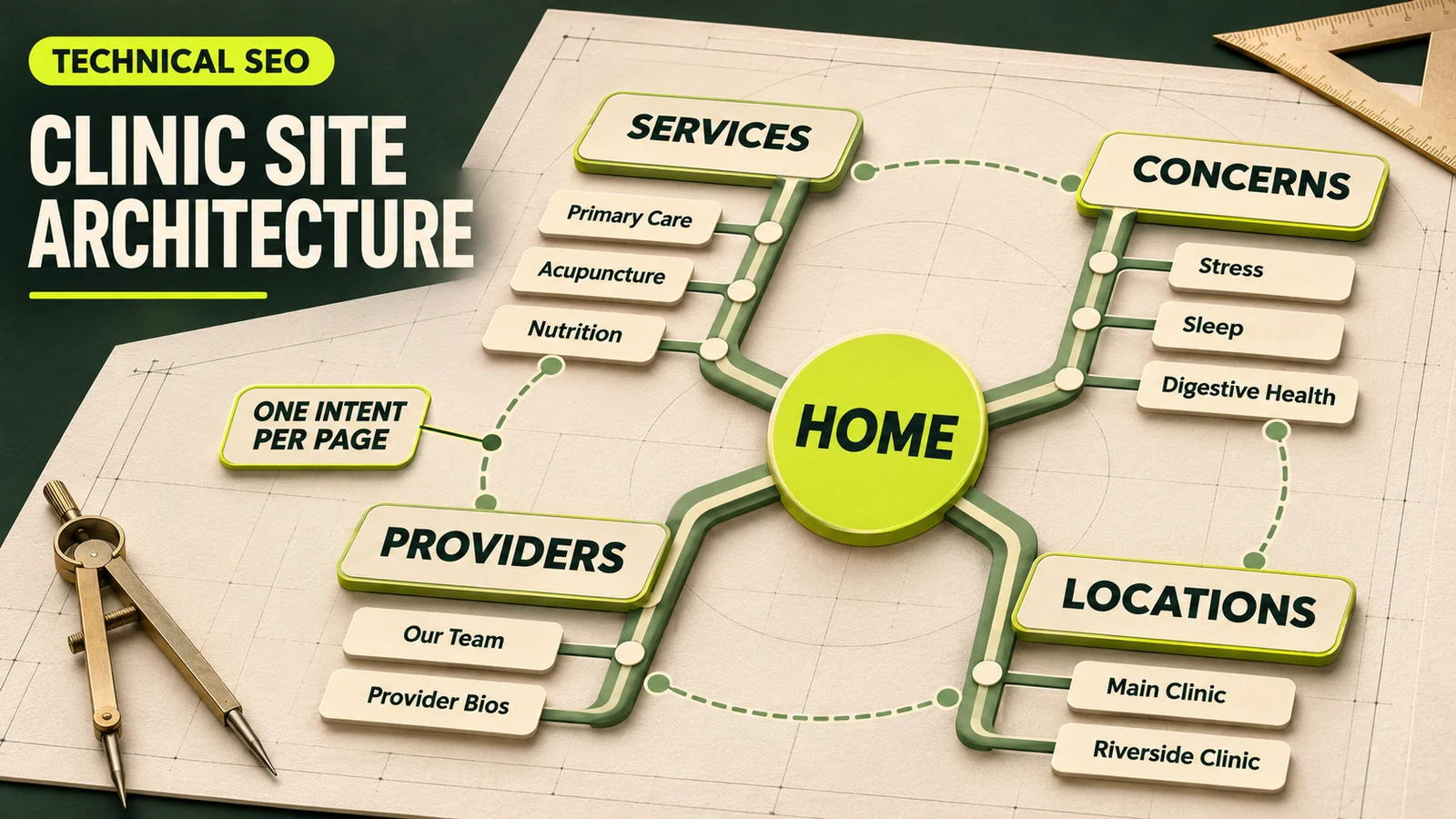
A multi-service clinic website should be organized around four real entities: services, patient concerns, providers and locations. Give each distinct search intent one primary page, group related pages under useful hubs, and connect pages where a patient would naturally need the next piece of information. The home page introduces the practice; it should not be forced to rank for every treatment.
The difficult part is not choosing a tidy menu. It is deciding which URL owns each question. If a service page, condition page, provider biography and location page all repeat the same generic copy, search engines and patients receive four weak answers. A clear ownership map produces fewer, stronger pages.
Useful rule: one primary intent per page does not mean one keyword per page. A strong page can answer closely related queries, but it needs one unmistakable purpose.
1. Inventory what the clinic actually offers
Start outside the website. List the services patients can book, concerns the team addresses, clinicians who provide care, and physical or virtual locations where care is genuinely available. Add operational details such as eligibility, visit format, price model and booking route.
Then review current URLs and search performance. Record the page title, intended audience, clicks and queries, internal links, conversions and whether the information is current. This exposes pages that compete for the same intent, orphan pages with no internal route, and thin pages created from a template rather than patient need.
This inventory also prevents marketing from promising combinations the clinic cannot deliver. A provider may offer only two of six services. A location may not have the same equipment or availability as another. Architecture should reflect those differences instead of manufacturing a complete service-by-location grid.
2. Assign one page to own each primary intent
Create a page-ownership sheet before writing. For every proposed URL, state the question it answers, the primary audience, the facts only that page can supply, and the next action. If two rows have effectively the same answer and call to action, they may belong on one page.
| Page type | Primary job | Information it should own | Natural next step |
|---|---|---|---|
| Service | Explain a care option | Fit, process, provider team, costs and booking route | Book or meet a provider |
| Concern | Help a person understand the clinic's approach to a need | Symptoms discussed responsibly, evaluation process and relevant services | Explore the appropriate service |
| Provider | Establish clinician trust and scope | Verified credentials, philosophy, services and locations | View availability |
| Location | Help someone visit a real clinic | Address, access, hours, local team, available services and directions | Book at that location |
| Article | Answer a narrower informational question | Educational explanation with sources and appropriate limitations | Read the relevant service page |
This is the practical difference between architecture and keyword stuffing. The page type determines what evidence belongs there. It also keeps the provider biography from becoming a duplicate service page.
3. Build a service hub, then dedicated service pages
A services hub gives patients an overview and routes them by need. Each important service can then have a dedicated page when it represents a distinct offering and the clinic has enough specific information to help someone decide. The page should cover who the service is for, what the first visit involves, who provides it, where it is available, fees or payment expectations, limitations and the correct booking path.
Do not split pages only because two keyword phrases differ. If “nutrition consultation” and “nutrition counseling” describe the same appointment, provider group and decision, one comprehensive page is usually clearer. Split when the audience, clinical process, eligibility, evidence or next step is materially different. The cash-pay clinic service-page framework shows what substantive service content looks like.
A simple structure might use /services/ as the hub and concise child URLs for the major services. Google recommends descriptive, readable URLs, but the folder itself is not a ranking shortcut.[2] Choose a durable pattern that the team can maintain.
4. Use concern pages only when they add a different answer
Patients may search by a concern before they know the name of a service. A concern page can explain how the clinic evaluates that need, which services may be relevant, who is qualified to help and when another form of care may be more appropriate. It should not diagnose the reader or promise an outcome.
Do not create dozens of pages by swapping a condition name into identical paragraphs. Combine closely related topics when the useful answer would be the same, and create a separate page only when the clinic can provide distinct, reviewed guidance. Our guide to functional medicine condition pages covers clinical review, responsible claims and patient-centered structure.
5. Treat each provider page as a stable entity
Every current clinician should have one canonical biography with verified credentials, professional scope, care philosophy, relevant services, languages, locations and a booking route. Link service pages to the clinicians who actually provide that care; link provider pages back to their services and locations.
Avoid creating separate biographies for every service or office. That fragments authority and creates update risk when a credential, schedule or location changes. One maintained page can support multiple relationships while retaining a clear purpose: helping a patient evaluate the provider.
6. Create substantial pages for real locations, not every combination
Each staffed physical location deserves a useful page with its name, address, contact method, hours, directions, accessibility details, photos, providers and genuinely available services. Link the location to those shared service and provider pages.
Be cautious with pages such as “acupuncture in City A,” “acupuncture in City B,” and every other service-city combination. If the only difference is the city name, the pages offer little independent value. Google classifies substantially similar pages made to rank for related queries and funnel users to one destination as doorway abuse.[3]
When a service-location page can make sense: the location has unique staff, equipment, eligibility, scheduling, pricing or a locally specific patient journey and the clinic can maintain the page. Local demand alone does not make copied content useful.
7. Keep URLs, navigation and breadcrumbs predictable
Primary navigation should expose the decisions most patients need: services, concerns or focus areas, providers, locations, about and booking. A large clinic may use hub pages and a well-structured menu rather than placing every page in the top navigation. Important pages should also receive contextual links from related content.
Use short, descriptive URLs and avoid unstable IDs or needless parameters when practical. If an existing URL already performs and accurately represents the page, do not change it solely to add a folder. A hierarchy is valuable because it helps people organize the site, not because a deeper or shallower path guarantees rankings.
Visible breadcrumbs help users move upward through the structure, and Google notes that a breadcrumb trail indicates a page's position in the site hierarchy.[4] Match breadcrumb labels to the real navigation rather than inventing a hierarchy only in structured data.
8. Build internal links around patient decisions
Internal links should explain relationships, not merely distribute “SEO value.” Use descriptive anchor text and add links where the destination answers the reader's likely next question. Google advises writing good link text so users and search engines can understand the destination.[1]
Service ↔ concern
Show which care options may relate to a concern without claiming that one treatment fits everyone.
Service ↔ provider
Connect the offering with the qualified clinicians who actually deliver it.
Service ↔ location
Show where the service is available and route the booking correctly.
Article → core page
Let educational content support the relevant service or concern rather than compete with it.
Audit for orphan pages and excessive boilerplate links. A link in the footer of every page is not a substitute for a meaningful relationship in the main content. This linking model also helps a clinic that currently appears for its name but not its services establish clearer non-branded topics.
9. Reinforce the architecture with technical signals
Use one self-referencing canonical on each indexable page, unique titles and headings, and XML sitemap entries for canonical URLs. Google describes XML sitemaps as a versatile way to provide information about site URLs, but a sitemap does not replace crawlable internal links.[5]
Add structured data only when it accurately represents visible content. BreadcrumbList can describe the breadcrumb trail. Relevant local-business markup can communicate details such as hours and departments, but fields must match the real clinic and page.[6] Structured data is supporting context, not a cure for duplicate or thin pages.
When consolidating pages, choose the strongest destination, move any unique useful material, update internal links and apply a permanent redirect from each retired URL. Do not leave redirected URLs in navigation or the sitemap.
An illustrative clinic structure
Consider a hypothetical two-location integrative clinic offering primary care, acupuncture and nutrition services. Its lean architecture could include:
- Home and about pages
- A services hub plus three substantive service pages
- A concerns hub with only the concern pages that have distinct, reviewed guidance
- A provider hub plus one page for each current clinician
- A locations hub plus one detailed page for each real clinic
- Articles that answer narrower questions and link back to the appropriate core page
The clinic would not automatically create six service-location pages. It would connect each shared service page to the locations where that service is available. If one office later develops a genuinely different program, a dedicated local page can be added with real information.
A practical architecture audit and migration plan
- Crawl and inventory: export every indexable URL, canonical, title, heading, status code and internal-link count.
- Group by intent: compare pages that rank for or describe the same service, concern, provider or location.
- Choose an owner: designate the URL that best satisfies each primary question.
- Keep, improve, merge or remove: document the decision and evidence for every duplicate or thin page.
- Map relationships: specify service-provider-location and article-core-page links based on reality.
- Test before launch: validate navigation, breadcrumbs, canonicals, redirects, schema, forms and booking routes.
- Monitor afterward: watch indexing, queries, organic landings, bookings and 404s; investigate losses by page cluster.
Do not measure success only by the number of indexed pages. Track whether non-branded patients reach the correct service, provider or location page and complete an appropriate next step. A smaller architecture can outperform a larger one when every page has a defensible purpose.
Frequently asked questions
Should every clinic service have its own page?
Create a dedicated page when the service represents a distinct patient intent and the clinic can provide specific, useful information. Closely related variants with the same audience, process and next step may belong on one stronger page.
Should a clinic create a page for every service and location combination?
Usually not. Create a substantive page for each real location and shared service pages for the clinic. Add a combination page only when demand and genuinely different local information justify it.
How many clicks from the home page should important pages be?
There is no universal ranking number. Important pages should be easy to reach through clear navigation, hubs and contextual links without depending on an arbitrary click-depth target.
Can provider and service pages target the same keyword?
They can discuss related topics, but their primary jobs should differ. The service page explains the care option; the provider page establishes one clinician's credentials, scope and approach.
Build a site patients can understand
A strong multi-service clinic website does not need a page for every phrase. It needs an accurate model of the practice, one clear owner for each patient question and deliberate paths between related services, concerns, clinicians and locations.
Wellness Practice Marketing can turn that model into a prioritized SEO and website plan without multiplying thin pages or disrupting useful existing URLs.